 REASONS GAMES

HOW I MAKE THE SPRITES
An image model draws one 8 cell sheet per animation, and code does every part that has to be exact. Each cell is one frame, so a single frame can be fixed without regenerating the animation.
I was asked what I use for sprites, so here is the whole thing: two animations from prompt to finished frames, the exact image prompts that made them, the order of operations, and a brief at the bottom you can hand straight to your own agent.
EXAMPLE 1 · A CRATE OPENING
One call, eight frames, one credit. The model draws the whole animation as a 2x4 grid on flat magenta, so every frame shares the same generation, the same light and the same colours.
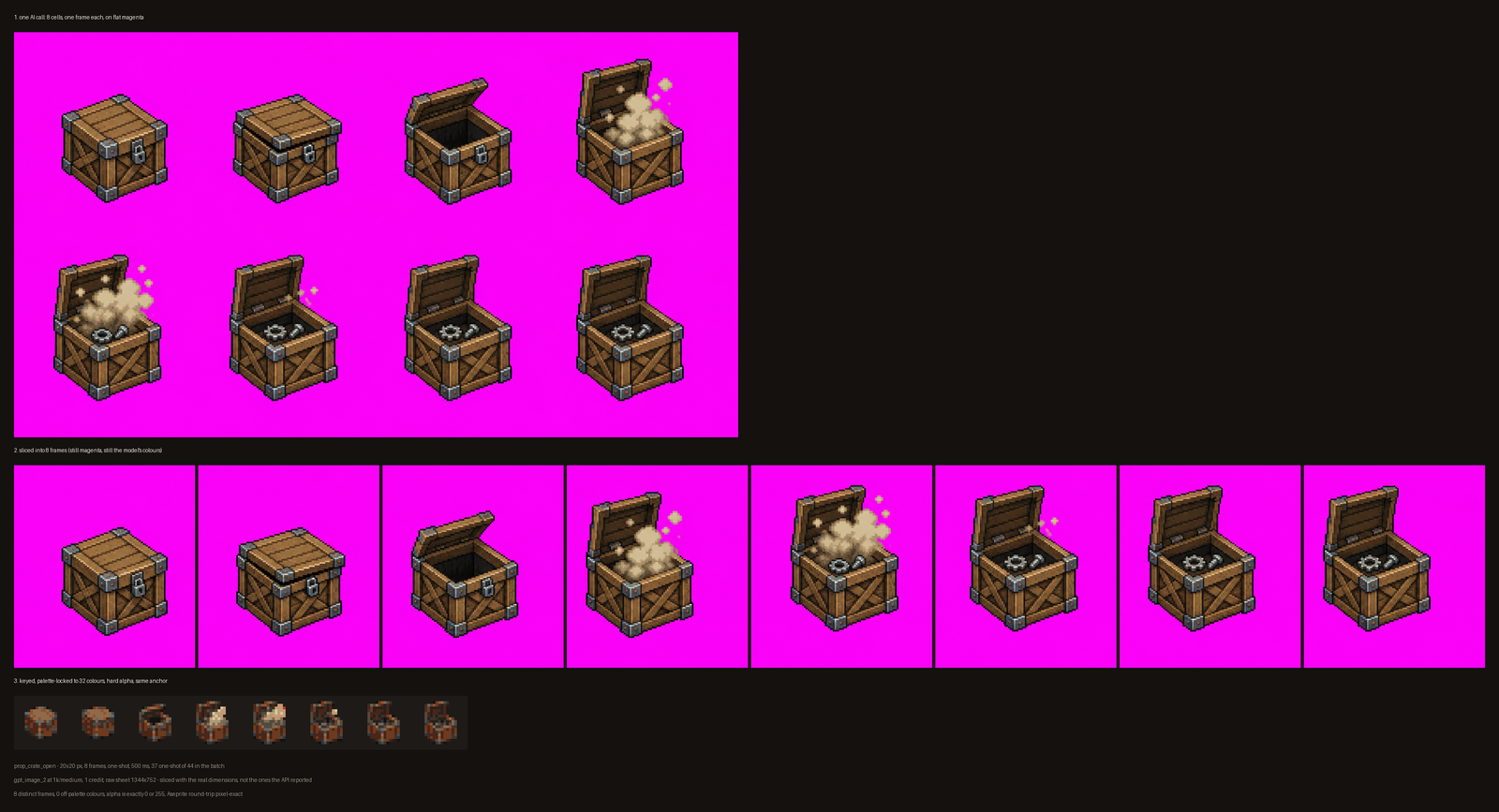
START TO FINISH Top: what the model returned, still on its magenta. Middle: sliced into 8 frames at the real image dimensions. Bottom: after keying, palette lock to 32 colours and hard alpha.

FINISHED 20x20 px, 8 frames, one-shot, 500 ms. In game this plays once when the player opens a crate and then holds on the open frame.
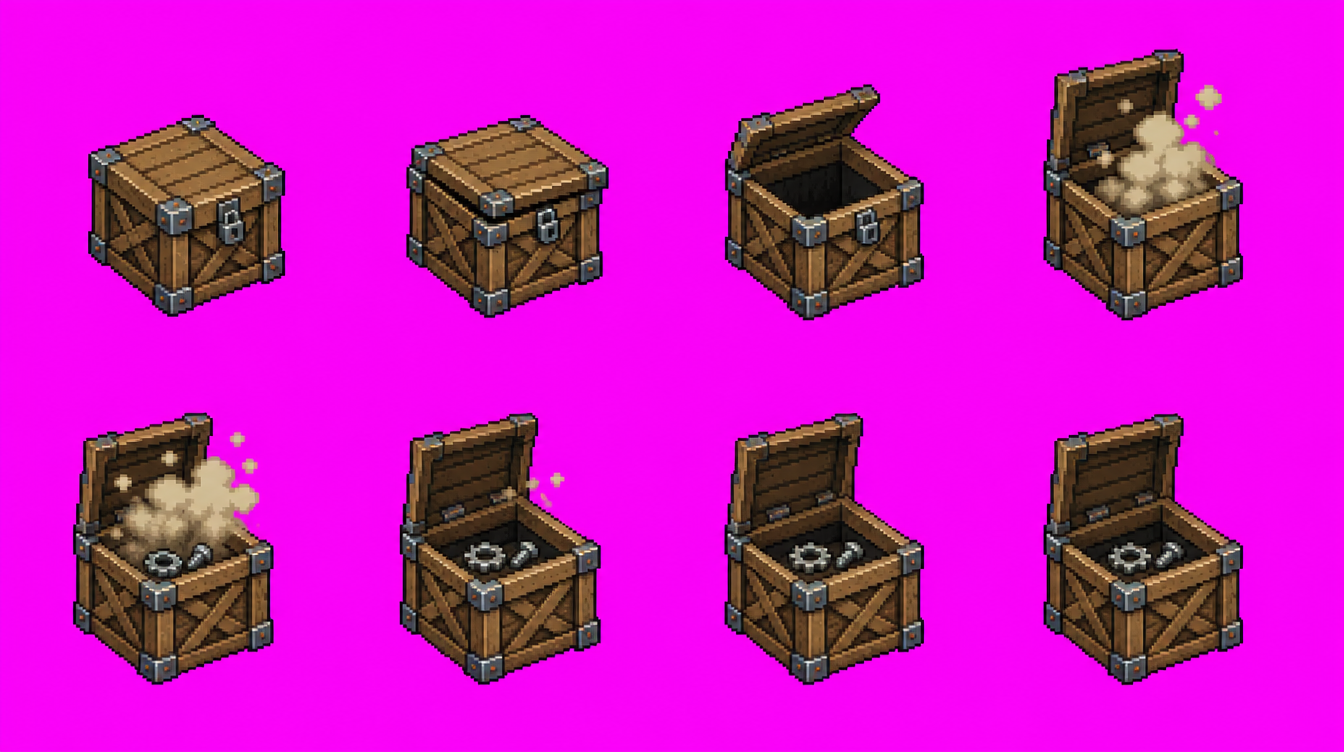
THE RAW SHEET 1344x752, straight from gpt-image-2 at 1k. Nothing here is hand drawn and nothing is used as-is.
IRONFALL 16-bit pixel-art animation sheet, chunky square pixels, flat 2-3 tone shading, no antialiasing, matching the approved Ironfall prop and FX family (muted rust steel olive concrete, cold machine blue, ember and alert red accents). Exactly 8 distinct frames in a strict 2x4 grid (left-to-right, then top-to-bottom), one frame per cell, equal cells, generous empty magenta margins, nothing crossing cell borders, the subject at the SAME position and size in every cell unless the motion says otherwise. Solid flat #FF00FF magenta in every cell; all pixels opaque; no drawn cell borders, panels, frames or grid lines anywhere. Ramps: soot #14110F #26211D #3B332C, dust #54493D #7A6A55 #A89A7C, steel #2A3640 #3E505C #5C7280 #8499A3 #B7C4C6, rust #4A2518 #6E3A20 #94512A #B8742F, amber #D6A24A, olive #2C3A2E #3F5238 #5D7046 #85966A, mech blue #3A76A8 #6CBEE2, water #366068, fire #E66E38 #F0D278, alert red #C83028. No magenta inside the subject. No text, labels, numbers, UI, characters or creatures. A LOOP asset stays equally alive in all 8 frames; a one-shot progresses to a peak and settles. Native logical frame size 20x20 pixels, small in-game prop or effect scale. A wooden supply CRATE seen from a high three-quarter top-down game angle, matching the existing Ironfall crate: plank sides, a big X brace, metal corner brackets. One-shot opening sequence: 1 closed with a small padlock; 2 the lid lifting a few pixels at the left; 3 lid wider open, dark interior showing; 4 lid fully open, a pale dust puff rising; 5 dust spreading, two small metal parts visible inside; 6 dust thinning, contents settled; 7 open crate with a faint dust residue; 8 open crate, still. The crate body stays in place; only the lid and dust move.
EXAMPLE 2 · A RAIN COLLECTOR, AND THE JITTER FIX
This one is the interesting case. The water level rises and a drip forms at the tap, so those should change every frame. The tank, the stand and the fittings should not. The model redraws the whole sprite in every cell, so the tank shimmered, and that is what flickers on screen.
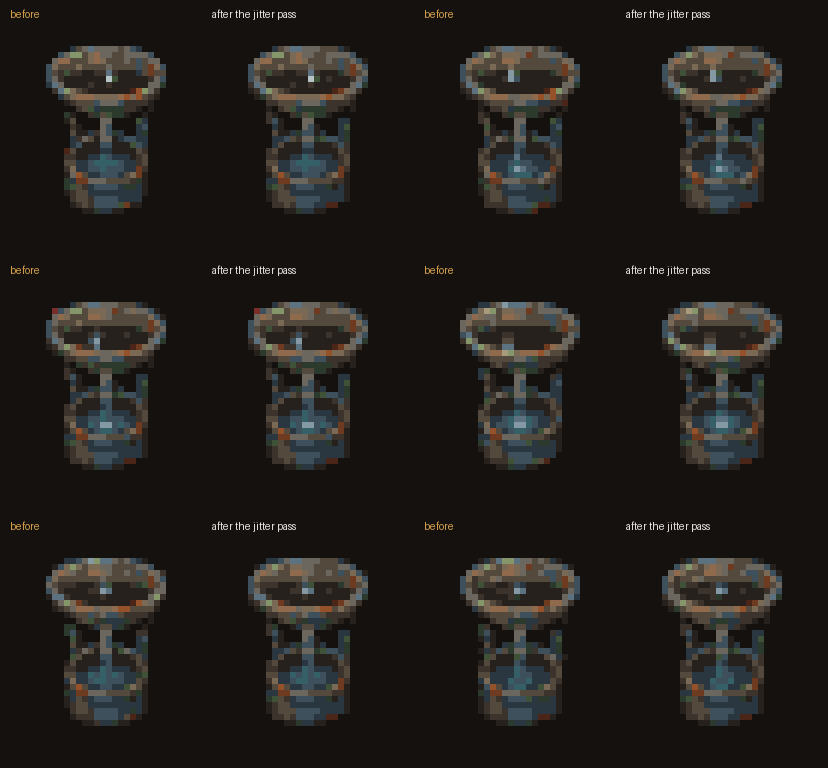
BEFORE / AFTER Left: before the pass, 222 pixels of the sprite change frame to frame, tank and stand included. Right: after it, 113 - the water and the drip, and nothing else.

FINISHED 32x32 px, 8 frames, loops forever. Only the water and the drip move.
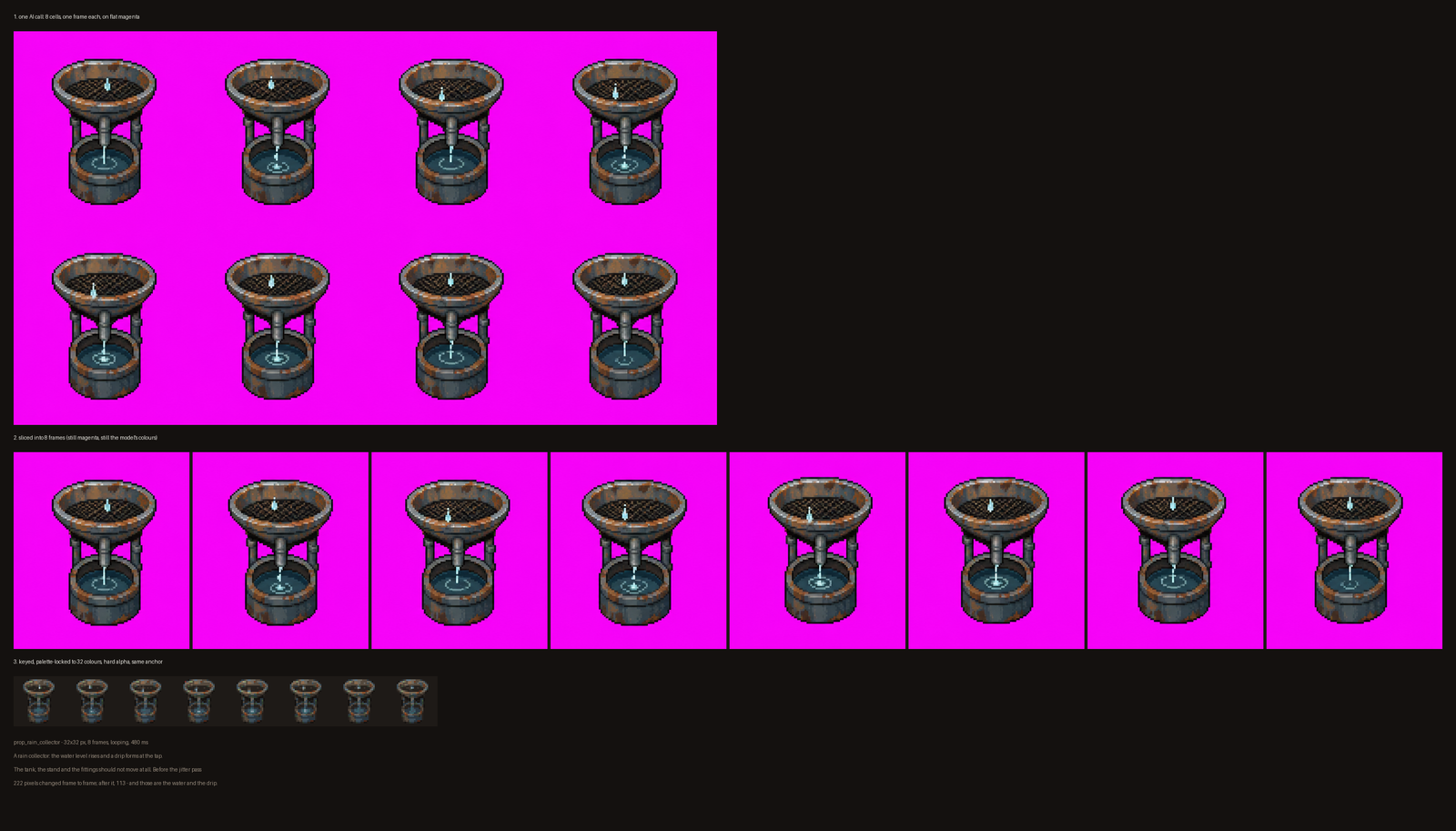
START TO FINISH Same three stages as the crate: raw sheet, sliced frames, finished and stabilised frames.
IRONFALL 16-bit pixel-art animation sheet, chunky square pixels, flat 2-3 tone shading, no antialiasing, matching the approved Ironfall prop and FX family. Exactly 8 distinct frames in a strict 2x4 grid (left-to-right, then top-to-bottom), one frame per cell, equal cells, generous empty magenta margins, nothing crossing cell borders, the object at the SAME position and size in every cell. Solid flat #FF00FF magenta in every cell; all pixels opaque; no drawn cell borders, panels or grid lines. Ramps: soot #14110F #26211D #3B332C, dust #54493D #7A6A55 #A89A7C, steel #2A3640 #3E505C #5C7280 #8499A3 #B7C4C6, rust #4A2518 #6E3A20 #94512A #B8742F, amber #D6A24A, olive #2C3A2E #3F5238 #5D7046 #85966A, mech blue #3A76A8 #6CBEE2, water #366068, fire #E66E38 #F0D278, alert red #C83028. No magenta inside the object. No text, labels, numbers, UI, characters, creatures or ground. A LOOP asset stays equally alive in all 8 frames; a one-shot progresses to a peak and settles. Native logical frame size 32x32 pixels, small in-game prop scale. A rain COLLECTOR seen from a high three-quarter top-down angle: a wide rusted steel funnel with a mesh screen, sitting on a short stand over a dark barrel, with a pipe running down into the barrel. As a continuous LOOP, water drips from the funnel into the barrel, small splash rings appear in the barrel water, and a thin trickle runs through the pipe. Frames differ in droplet positions, splash ring size and barrel water level within a small range. No rain in the background, no scenery, no character.
THE ORDER OF OPERATIONS
1 THE SHEET
The prompt is a specification, not a wish. Strict 2x4 grid, one frame per cell, subject the same size and position in every cell, solid #FF00FF everywhere else, no drawn borders or panels, the palette written out as hex, and then the motion described frame by frame: what moves, and what must stay still.
- Loops are asked for as "equally alive in all 8 frames" so no frame reads as a pause.
- One-shots are asked to progress to a peak and settle, so the last frame can hold.
- One call per animation. Eight frames that share a generation beat eight calls that each drift.
2 FINISHING, IN CODE
Everything after the model is deterministic, because every one of these steps is something an eye cannot hold across 8 frames and 139 sheets:
- Slice the 8 cells using the real image dimensions. The size the API reports is not the size of the file, so it reads the PNG.
- Key the magenta, and strip the pale panel the model sometimes draws around a cell even when borders are forbidden.
- Snap every pixel to the project palette. The gate is 0 off-palette colours.
- Force alpha to exactly 0 or 255. Partial alpha is how a pixel sheet starts looking soft.
- Register the frames against the reference frame and scale them all by one common factor, so nothing drifts by a pixel in motion.
- Export the frames, an editable Aseprite file with real tags, a PNG/JSON strip, a portable Godot SpriteFrames resource and a GIF for review.
3 THE JITTER PASS
A colour threshold cannot tell wanted motion from unwanted jitter: a screen flickering between two similar blues changes less than a wobbling outline does. So the pass separates on shape. It finds the animated region by how dense the change is over a small window, grows it by a pixel, and freezes everything else that is present in every frame to one reference frame.
It runs per animation tag, inside the Aseprite file, so the editable source is what gets fixed and the exported sheet follows. It also refuses to touch sheets that pack alternatives instead of animation, like damage states, decal variants or autotile masks, because those frames are not a timeline.
On this project it found jitter in 22 of the 139 sheets that were already in the game and locked about 4,800 pixels.
4 GATES BEFORE IT SHIPS
- 0 off-palette colours, and alpha values of only 0 or 255, across every sheet.
- 8 distinct frames, because two identical frames means the animation stalls.
- A pixel-exact round trip: export from the Aseprite source and diff it against the sheet.
- A real animated sprite reaching every frame in the engine, not just a file that exists.
- A headless run of the game that comes back with zero errors.
- Loop checks by actual pixel difference and silhouette overlap, because a similar silhouette is not a duplicate frame.
5 REVIEW, THEN PRODUCE
Before mass producing anything I put every animation on a local page with three buttons per asset: approved, fix, re-run. Each card shows the animation and a strip of all frames side by side, because a moving preview hides exactly the per-frame defect you are hunting for. Clicks save straight to a file, so the verdicts are not stuck in a chat window.
HAND THIS TO YOUR OWN AGENT
This is the brief I would give a coding agent starting from nothing. It is long on purpose: the parts that go wrong are the parts people leave out.
TASK
Build a 2D sprite-animation pipeline for a game. An image model draws ONE SHEET per animation;
deterministic code does everything that has to be exact. Do not use a video model: each cell of the
sheet is one frame.

STACK
Python 3 (Pillow + numpy) for finishing. Aseprite driven from the command line as the editable
source and the exporter. Godot 4 for playback and for the SpriteFrames resource. An image model that
can hold a grid (GPT Image 2 works well).

STEP 1 — THE SHEET PROMPT (one call per animation)
Ask for exactly this, and do not deviate:
- 16-bit pixel-art animation sheet, chunky pixels, flat 2-3 tone shading, no antialiasing
- Exactly 8 distinct frames in a strict 2x4 grid (left to right, then top to bottom), equal cells
- The subject at the SAME position and size in every cell, unless the motion says otherwise
- Solid flat #FF00FF magenta in every cell, all pixels opaque
- No drawn cell borders, panels, frames or grid lines anywhere
- Palette: list the project's colours as hex (keep it to about 16 hex values in the prompt)
- No text, labels, numbers, UI, characters or creatures (drop whichever you do not want)
- State the motion: for a LOOP say "equally alive in all 8 frames"; for a one-shot say "progresses
  to a peak and settles"
- Then write the motion frame by frame: "Frames: 1 ...; 2 ...; 3 ...", naming what moves AND what
  must stay still ("the body stays in place; only the lid and the dust move")
- Give the native frame size in pixels and say it is a small in-game prop or effect, not an
  illustration
One sheet gets you 8 frames that share a generation, a light direction and a palette. Never ask for
one frame at a time.

STEP 2 — FINISHING (in code, never by eye)
- Read the REAL image size. Do not trust the size the API reports: real files came back 1344x752,
  1536x1024, 1774x887, 1983x793 and others.
- Slice 8 cells with rounded fractional boundaries:
  r, c = divmod(i, 4); box = (round(c*w/4), round(r*h/2), round((c+1)*w/4), round((r+1)*h/2))
  Odd dimensions are normal, so slice from the file you actually got.
- Key the magenta: red > green+35 AND blue > green+35.
- Remove the pale panel the model sometimes draws even when borders are forbidden: light low-chroma
  pixels (min channel >= 185, chroma <= 55) that form full-span lines inside a cell.
- Snap every pixel to the project palette. Your gate is 0 off-palette colours.
- Force alpha to exactly 0 or 255. Partial alpha is how sheets start looking soft.
- Register the frames: translate each frame so its opaque silhouette matches the reference frame
  (or use the source anchor for effects that must keep a fixed origin), then scale every frame by
  ONE common factor so they match size. A frame that drifts a pixel reads as broken in motion.
- Export per animation: frames/*.png, an editable .aseprite with real tags, a PNG/JSON strip, a
  portable Godot SpriteFrames .tres, and a GIF preview for review.

STEP 3 — THE JITTER PASS (the part everybody misses)
The model redraws the whole sprite in every cell, so parts that should be identical change by a
pixel or a shade each frame, and the sprite flickers in game. A colour-range threshold cannot
separate that from real motion: a screen flickering between two similar blues changes LESS than a
wobbling outline does. Separate on SHAPE instead:
- per pixel, spread = max minus min of R, G and B across that tag's frames
- change mask = spread > 12
- density = the share of a 5x5 window that changed; the animated core is density >= 0.55, plus
  anything with spread > 90
- dilate that core by 1 pixel so the animated part keeps its own outline
- reference frame = the frame with the most opaque pixels
- lock = a pixel that is opaque in EVERY frame of the tag AND outside the dilated core; set it to
  the reference frame's value in all frames
- run this per ANIMATION TAG, inside the .aseprite file (a Lua script driven by the Aseprite CLI),
  so the editable source is what gets fixed and the exported sheets follow from it
- never run it across a sheet that packs alternatives instead of animation (autotile masks, decal
  or material variants, damage states, direction sets): those frames are not a timeline, and
  averaging them corrupts the art
On a real project this found jitter in 22 of 139 sheets already in the game and locked ~4,800
pixels. One prop changed 81 pixels of its own housing every single frame before the fix.

STEP 4 — GATES BEFORE ANYTHING SHIPS
- 0 off-palette colours across every sheet
- alpha values are only {0, 255}
- 8 distinct frames per animation (two identical frames means the animation stalls)
- pixel-exact round trip: export from the .aseprite and diff it against the sheet
- a real AnimatedSprite2D playback test that reaches every frame, not just a file that exists
- a headless run of the game with zero errors
- loop QA: compare consecutive frames by actual RGBA difference and silhouette overlap. A similar
  silhouette is NOT a duplicate frame. Measure before you reject a take.

STEP 5 — REVIEW BEFORE YOU MASS PRODUCE
Build a local review page first: one card per animation showing the animation AND a strip of all
frames side by side (a moving preview hides exactly the per-frame defect you are hunting), the spec
it was made against, and three buttons per item: approved, fix, re-run. Save every click straight to
a JSON file your agent reads. Verdicts that only exist in a chat window are verdicts you have lost.

COST
GPT Image 2 through a ChatGPT subscription, or Higgsfield at 1k + medium = 1 credit per sheet. A 1k
sheet (1344x752) massively oversamples a 32x32 frame, so 1k is the right setting rather than the
cheap one. 16 animations = 16 sheets = 16 credits.
WHAT IT RUNS ON
Questions about any of it, or want the scripts looked at: david@reasons.games · Ironfall dev log